
v0.0.19 - 2024-03-20
NEW: User Interface Revamp
Section titled “NEW: User Interface Revamp”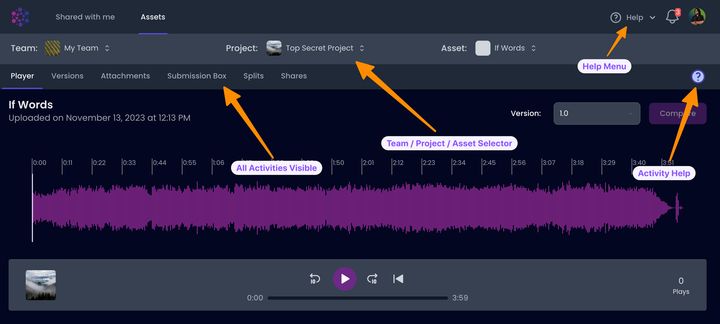
Asset Focused UI
Section titled “Asset Focused UI”- The primary view in Aliada Create has been updated to focus on the Asset
- After selecting an Asset, the lower section now displays all available Activities
- Previously, many of the Activities were “hidden” or “buried” within the user interface, which was not intuitive
- We hope you find this new user interface more productive and user-friendly.
Dashboard Cards
Section titled “Dashboard Cards”- We transitioned from displaying one large card to showing four smaller cards on the dashboard
- Each card provides a key piece of information to enhance your Aliada Create experience
Activity Help
Section titled “Activity Help”- Context-specific help is now available for any selected Activity using the Help Icon
Help Menu
Section titled “Help Menu”- We’ve introduced a Help menu to facilitate easy exploration and understanding of Aliada Create’s features and what’s new
- Take note of the new Markdown help page!
- Numerous internal links for help or clarification have been relocated to the (New) Support Site
NEW: Audio Streaming/Player 3.0
Section titled “NEW: Audio Streaming/Player 3.0”- LOTS of internal work has been completed to enhance the audio streaming and player functionalities across all devices
- This is an area that we are committed to improving continuously
NEW: Splits 1.0 (For All Users)
Section titled “NEW: Splits 1.0 (For All Users)”- Previously, Splits were only available to a small group of users
- Splits enable you to define both Composition and Performance splits
- Anyone included in Splits will receive notifications and stay informed of any changes
- In your Profile Settings you can enter all of your Performance Rights Organization (PROs) membership/ID numbers
- More functionality is coming for Splits 🤩
UPDATED: Plays Added to My Usage Dashboard Card
Section titled “UPDATED: Plays Added to My Usage Dashboard Card”- We now show Plays for all Assets & Versions on your Account
UPDATED: Archive, Restore, or Delete Asset Version
Section titled “UPDATED: Archive, Restore, or Delete Asset Version”- Dialogs confirming archiving, restoring, or deleting asset versions now display the name/version you are acting on for confirmation.
UPDATED: Date & Time Tooltips
Section titled “UPDATED: Date & Time Tooltips”- Anywhere a date & time is shown (ex. “4 days ago”) you can hover over to see the full date & time (ex. “March 3, 2013 4:15 PM CST”)
UPDATED: Weekly Summary Team Emails
Section titled “UPDATED: Weekly Summary Team Emails”- Updated layout of the weekly summary team email to be easier to read
UPDATED: New Asset Versions Inherit Key & BPM of Previous Version
Section titled “UPDATED: New Asset Versions Inherit Key & BPM of Previous Version”- To maintain consistency, new Versions inherit the Key and BPM from the previous version
UPDATED: Shared Assets Versions Now Show Version
Section titled “UPDATED: Shared Assets Versions Now Show Version”- Small quality of life improvement… If you share an Asset Version the Version will be shown in the title
- optimized image and font assets to be delivered faster
- emailed notifications now show entire notification, not a shortened version
- team invites also go to your “bell” notification, not just email
- as usual, we changed strings, cleaned and leveled frets, and gave everything a proper once over