
v0.0.20 - 2024-04-03
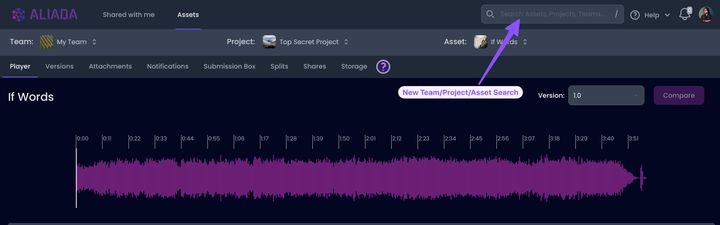
NEW: Team/Project/Asset Search
Section titled “NEW: Team/Project/Asset Search”- Quickly switch to any team, project or asset by searching
- Search activated by pressing ’/’ key
- You can use [Tab] key to navigate the search results
NEW: Asset Photo
Section titled “NEW: Asset Photo”- You can now set a Photo for your Asset
NEW: Asset Storage Activity
Section titled “NEW: Asset Storage Activity”- We’ve introduced an Asset Storage Activity that displays storage details for an Asset
NEW: Asset History Activity
Section titled “NEW: Asset History Activity”- We’ve introduced an Asset History Activity that displays all notifications related to the asset
NEW: Last 10 Assets on Dashboard
Section titled “NEW: Last 10 Assets on Dashboard”- The Dashboard now displays the most recent 10 assets you’ve interacted with for easy access
UPDATED: Team/Project/Asset Menu Improvements
Section titled “UPDATED: Team/Project/Asset Menu Improvements”- We’ve aimed to make the process of switching between or creating teams, projects, and assets more intuitive
UPDATED: Description Edit Button on Player
Section titled “UPDATED: Description Edit Button on Player”- Implemented an edit button for Asset/Version descriptions, allowing for swift updates
UPDATED: Invites Show Who Wrote Message/Sent Invite
Section titled “UPDATED: Invites Show Who Wrote Message/Sent Invite”- Share and Team invites now show the name of the user who sent/wrote the invite message
UPDATED: Share Link Page
Section titled “UPDATED: Share Link Page”- UI updates made to the Player have also been done to the Share Link page (which is the Player for non-logged in users)
- Asset/Version description no longer shown to non-logged in users
- Updated CTA for non-logged in users
- many UI tweaks for a better user experience
- went OCD and sanitized all the mic windscreens