
Introduction to the Player
Player
The Aliada Create Player is a tool that allows you to listen to your audio assets.
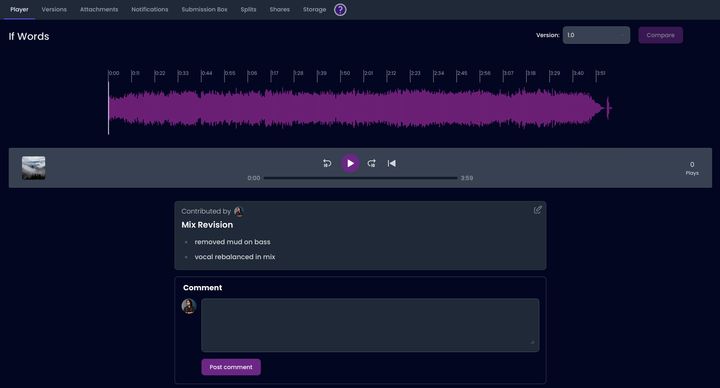
Below is an image of what the Player looks like:
Key Functions
Section titled “Key Functions”Here are some important functions you can use in the Player:
- Back 10 Seconds: Rewind the audio by 10 seconds to hear something again.
- Play/Pause: Start or stop the audio playback.
- Forward 10 Seconds: Skip ahead 10 seconds in the audio.
- Return to Zero (RTZ): Go back to the beginning of the audio track.
Version Selector
Section titled “Version Selector”The Version Selector lets you choose any available version of the asset to listen to. You can scrub through the audio or leave comments on specific parts.
Additional Features
Section titled “Additional Features”Learn more about how to use spans by clicking here for Span Details.
Compare
Section titled “Compare”To find out how to compare different versions of your audio, click here for Compare Details.
Comments
Section titled “Comments”If you want to know how to leave comments on your audio, click here for Comments Details.